
First time submitting a Work Order online?
Watch This Video!
HINT: Use settings gear on the video to adjust playback speed and/or click the arrows to make full screen!
Work Order Request Form FAQs
Here are some common questions you may find helpful when submitting the form above to submit a Work Order Request!
What is the Urgent, Rush or Time-Sensitive policy?
URGENT:
Urgent work should only be for mission-critical issues:
- Website is down
- Lost all access to your website and email
- Believe an update has created a significant issue on your site
- Security-related concern
There is no additional fee for truly urgent matters for our Compass, Expedition, Summit, and Adventure Care Plans! (NOTE: Basecamp Care Plan is charged the hourly rate for all additional changes, including urgent items. This is why we strongly recommend Compass Care Plan over Basecamp Care Plan.)
To ensure only truly URGENT items are labeled as URGENT, we have a $200 charge if this label is misused. If you label something URGENT that does not meet our definition of URGENT, we will bill you the $200 fee and complete the request following our RUSH policy. (See Rush policy below)
RUSH:
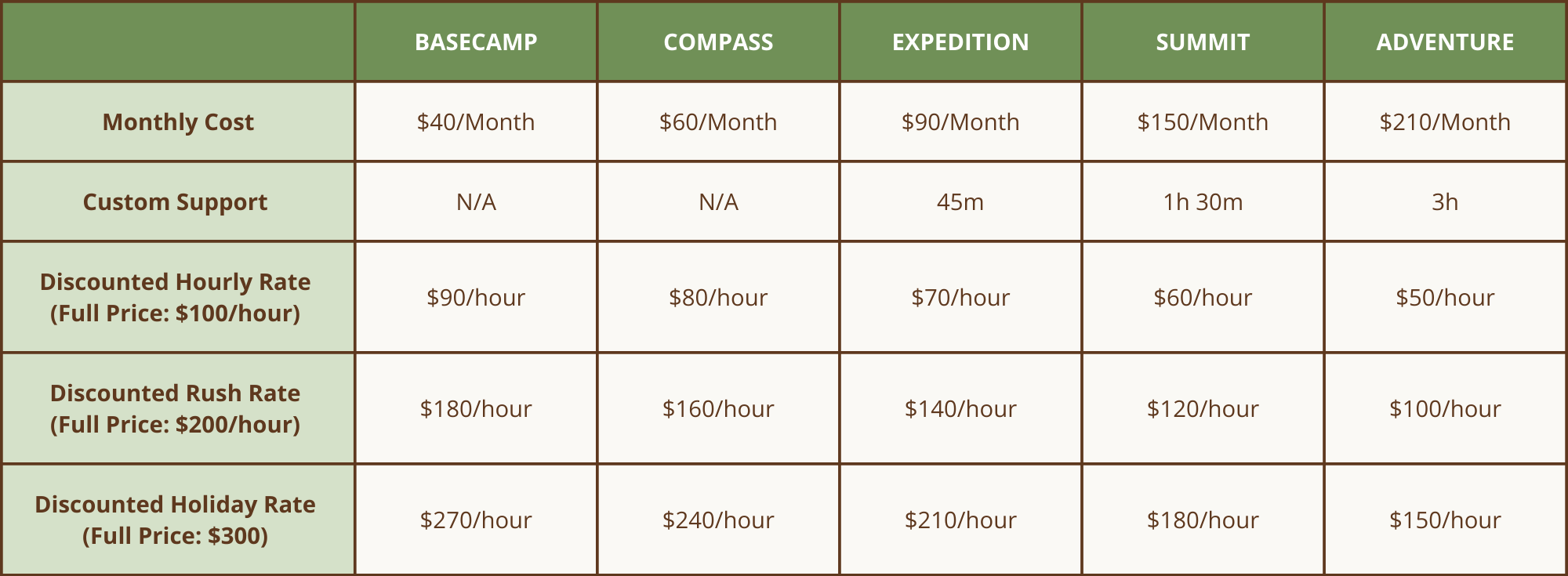
Rush work means you have a request for us to complete within 48 hours. Our Rush support fees are charged at a premium of 200% (300% on holidays and during Annual Intensive) of your Care Plans's discounted hourly rate. If using Custom Support hours for a Rush Work Order, you would use double the time it takes to complete.
Example: A Rush item that takes our team 30 minutes to complete would use 1 hour of your Custom Support hours.
TIME-SENSITIVE:
If you have a request that needs to be completed on a specific date/time, you can circumvent RUSH charges by planning ahead! Complete this form following your Care Plan's turnaround time before it needs to be completed with TIME-SENSITIVE as the priority level. Please include an overview of what needs to be completed so we can block time accordingly. Then, reply to the Work Order confirmation email to provide the full details we need to complete the request by 11:30 AM EST the day before, and we will get it done for you!
What is a Work Order?
A Work Order is a request for Journey to assist an existing client through consulting or completing services.
A Work Order is often related to a specific task that is needed and is usually estimated to take under two billable hours to complete. Anything over two billable hours is often complex, and a discussion is needed, which makes it more of a project than a Work Order. Don't worry if you aren't sure if something is a Work Order or Project. You can fill out this form, and our team will let you know if it doesn't fit under a standard Work Order Request!
Examples of common Work Orders include:
- Change website content
- Complete Markup round of revisions
- Post a new blog post
- Create/Design custom blog posts
- Add products or events
- Create and send e-newsletters
- Create a simple landing page
- Design social media graphics
- Create a new lead magnet
- Record a video training on how to make a change or use a tool
- Troubleshoot an issue or concern
- Customize a feature or design element
- Provide advice on third-party tools or services
- Answer complex questions
What Care Plan am I on?
Unsure of what your Care Plan is? Check your most recent Invoice from Journey or view the table below.
For example, if you are paying $40/month, then your Care Plan is Basecamp!

View the full Care Plan Comparison table for more details.
What are the fees for a Work Order?
Care Plan with Custom Support (Expedition, Summit & Adventure):
If you are on a Care Plan with Custom Support, you will only be billed for work above your monthly allocated time. If you have additional Work Orders to make above the time in your Care Plan, then you will have two options:
- If you want the Work Order completed immediately, we will bill for any time over your monthly allocated hours at your Care Plan's discounted hourly rate.
- If you prefer only to use the hours within your Care Plan, we can work on the request slowly, using your allocated hours each month until completed.
Care Plan without Custom Support (Basecamp & Compass):
If you are not on a Care Plan that includes Custom Support, by submitting this form, you understand you will be billed separately for this work order at your Care Plan's discounted hourly rate.
Quick Glance Care Plan Comparison Table:
View the full Care Plan Comparison table for more details.
When will a Work Order be completed?
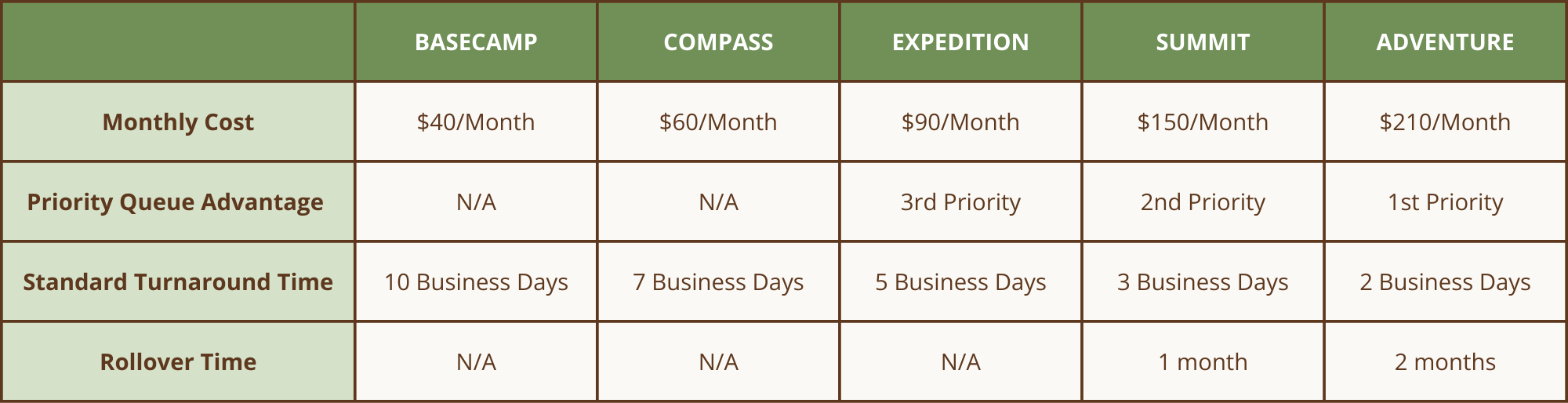
Your work order will be added to our queue and completed in the order it was received, based on your Care Plan priority level. Once we have received all the necessary information, the expected completion time is based on your specific Care Plan's turnaround time.
Please note that your work order request may occasionally require additional time to complete due to its size or complexity. We will keep you informed of the start and completion dates, as well as any additional billing costs that may be incurred.
Quick Glance Care Plan Comparison Table:
View the full Care Plan Comparison table for more details.
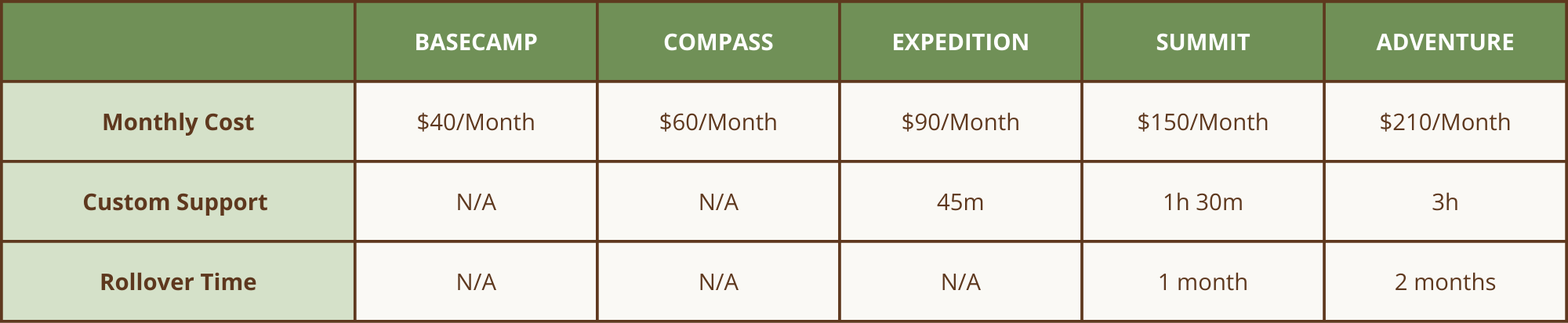
Is Custom Support included in my Care Plan?
Care Plan without Custom Support:
- Basecamp
- Compass
Care Plan with Custom Support:
- Expedition
- Summit
- Adventure
View the full Care Plan Comparison table for more details.
How many hours do I have available?
It depends! Here are a few variables to consider:
Number of Hours in Care Plan:
See the table below to confirm your Care Plan has Custom Support time and how much.
Have you had any recent Work Orders this month?
No? You will have the full amount of Custom Support time for your Care Plan available.
Yes? Feel free to contact our team to ask how much time you still have available this month. They'll be happy to assist you and provide the information you need.
How Custom Support Hours Work Normally
Each month you are able to use the Custom Support hours for your Care Plan. If you have multiple Work Orders within a month you can ask our team how many hours you still have available.
Hours must be used during the month and ONLY rollover if your Care Plan includes rollover hours.
We have the expiration on hours so that we can plan our time accordingly and help clients to be more intentional in taking steps forward on their website regularly. We do get that situations arise, and that is why we have the one-month flexible rollover built into the Summit Care Plan (2 months in Adventure) so that if something happened and you accidentally didn't use the hours from last month, you could still use them this month.
Saving Hours For Future Projects
We are fine with allowing you to save your hours in advance by being intentional ahead of time rather than not using them and suddenly needing to use them in retrospect.
If you have a big project coming up, let us know in advance that you would like to not use your hours for the next few months and hold them to use in the future. We just need you to keep open communication with us so we can plan to work on other projects rather than planning time to work on things for you this month. We'll mark it down on our calendar so we can shuffle things around accordingly. We're all about flexibility here, so there's no need to stress about committing to a hard-and-fast timeline. Just keep us in the loop, and we'll adjust the timeline as needed.
Just please keep in mind that we may need more time to use a lot of hours at once. If you have something that is time-sensitive approaching that you want to use a lot of hours for, then we recommend giving us a couple weeks heads up.
Example:
Let's say you wanted us to work on a new section of your website in August. You could let us know if you would like us to save your April, May, June, and July hours to use all in August. You can give us a brief description of what you think you will want us to hold the hours for, and we can plan on the calendar. Then, as it gets closer, we would need you to make sure we get the content, photos, or whatever else is needed so we have time to work on the project before your deadline. It is also ok to tell us that you will get us all the content by a specific date and for us to schedule to start working on the project in advance. This allows us to block the time even if we don't yet have all the information needed. Please ask if you are unsure what something needs to be completed as we are always happy to help!
Questions? Feel free to contact our team. We're always happy to assist you and provide the information you need.
View the full Care Plan Comparison table for more details.